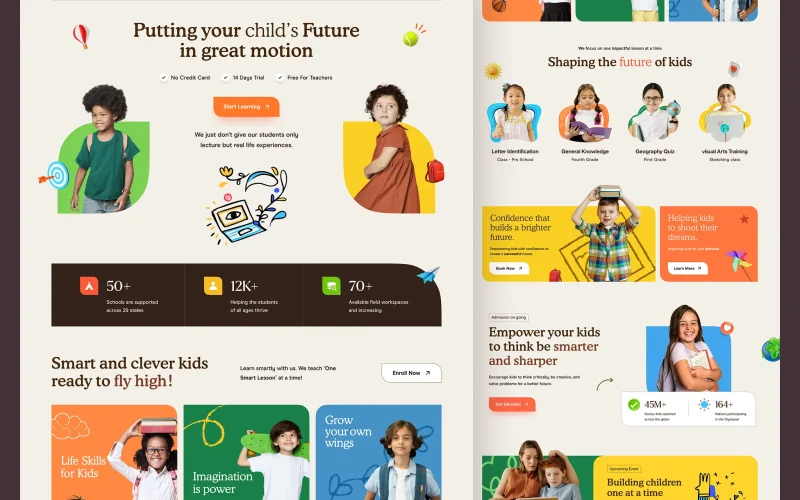

To understand the UX/UI design mistakes that affect user experience, it is essential to be clear about what this type of design entails and why it is so relevant in today’s digital environment.
In a highly competitive market, where users demand intuitive, fast, and pleasant-to-use websites and applications, design plays a key role in user retention and conversion.
However, UX/UI mistakes remain surprisingly common. The result? High bounce rates, abandoned forms, and a deteriorated digital reputation.
UX/UI design, when executed with a user-centered approach, seeks to facilitate navigation, guide attention, and build trust. Even so, even the most experienced designers can fall into common mistakes, whether due to lack of testing with real users, research and analysis, or by ignoring basic principles of human behavior in digital environments.
What is UX/UI Design?
UX/UI design is a key concept in the digital world, playing a fundamental role in how users interact with websites and applications.
To understand why certain mistakes affect user experience, it is essential to know what this type of design entails.
UX/UI design is composed of two interrelated areas:
UX Design (User Experience)
It refers to how a user feels when interacting with a product or service. User experience focuses on functionality, ease of use, and overall user satisfaction during their interaction with the platform.
UI Design (User Interface)
It is the visual part with which the user interacts directly. This includes graphic elements such as buttons, menus, typography, and colors that make up the product’s appearance.
Both disciplines must work together to create a cohesive, attractive, and functional experience. Well-implemented UX/UI design facilitates intuitive navigation and creates a pleasant user experience, which translates into higher retention and conversion.
Importance of UX/UI Design in the Digital World
UX/UI design not only improves the aesthetics of a website or application, but also has a direct impact on usability and the overall success of the product. Some reasons why good UX/UI design is crucial:
User Retention
One of the main objectives of UX/UI design is to ensure that users not only arrive at your website, but stay and return.
A well-structured, visually appealing, and functional design generates a positive experience that invites users to explore more content, interact with the platform, and trust the brand.
Elements that directly contribute to retention:
- Clear navigation
- Fast loading times
- Well-defined visual hierarchy
- Visual consistency
When a user feels comfortable navigating through an intuitive and pleasant interface, they are much more likely to stay longer, return on future visits, and recommend the site to others.
Investing in UX/UI design is a strategy to foster user engagement and loyalty.
Conversion in UX/UI Design
Conversion—whether a sale, a submitted form, a download, or any valuable action for your business—is closely related to how the user perceives and uses your platform.
Optimized UX/UI design naturally guides the user toward the desired goal, minimizes friction, and highlights calls to action (CTAs) at key moments in the journey.
A clear, accessible, and consistent interface builds trust and drives decision-making.
Most Common UX/UI Mistakes
In this section we will break down the most frequent mistakes that affect user experience in web design:
- Lack of clear visual hierarchy: users scan pages, they don’t read them word by word. A poor structure of H1, H2, and H3 can confuse and frustrate.
- Buttons without clear intent: invisible CTAs, unattractive or without feedback.
- Too much text or unnecessary elements: saturating an interface is an invitation to abandonment.
- Design not adapted to mobile: with over 60% of web traffic from smartphones, this is unforgivable.
- Lack of visual consistency: different colors, fonts, and styles generate distrust and are unprofessional.
Overestimating Aesthetics and Underestimating Functionality
An attractive design can capture attention, but if it is not functional, it will be ignored or rejected. For example, EasyJet is visually elegant, but with inconsistent navigation, it confuses more than it solves.
Poorly Placed Buttons
Incorrect button placement is another common mistake in UX/UI design. Buttons that are barely visible or in unusual places can frustrate the user and prevent conversion.
Place Buttons in Intuitive Locations
With contrasting colors and clear text such as “Buy now” or “Contact us“. Test their placement through A/B testing.
Lack of Responsive Design Harms UX/UI Design
Currently, most users browse from mobile devices. If your site is not adapted, you are offering a poor experience from the start. Non-responsive UX/UI design negatively affects dwell time and bounce rate.
Apply responsive design principles from the start of the project.
Tools like Figma or Adobe XD allow you to visualize and adjust for all devices.
Confusing or Unintuitive Navigation
Poor navigation structure is one of the most critical mistakes in UX/UI. If the user cannot easily find what they are looking for, they will abandon the site.
Organize the menu logically.
Group related sections and use clear labels. Add a visible search bar to facilitate access to content.
Excess Information Without Hierarchy Affects UX/UI Design
Overwhelming the user with text and visual elements without order can ruin even the best UX/UI design. The brain needs pauses and spaces to process information.
Use white space strategically.
Divide content into thematic blocks and highlight the most important elements with colors or icons.
Lack of Visual Feedback
The user needs to know that their action has had a consequence. Without visual feedback, such as animations or confirmation messages, they may think the site is not working properly.
Implement microinteractions that confirm actions.
For example, submitting a form or adding a product to the cart. This improves the experience and reduces uncertainty.
Lengthy and Confusing Forms
❌ Most common mistakes:
- Requesting unnecessary data
- Not offering immediate validation
- Lack of mobile design
- Unclear instructions
✅ Best practices:
- Request only the essentials
- Divide long forms into steps
- Use guiding microcopy
- Provide useful and visible error messages
Trends and Best Practices in UX/UI Design

Design Centered on Artificial Intelligence (AI) and Personalization
Artificial intelligence is increasingly integrated into UX/UI design, helping to create more personalized experiences for users. Personalization is key to improving interaction, and AI-based systems are capable of learning from each user’s behaviors and preferences.
This includes interfaces that automatically adapt to user needs, such as intelligent recommendations, conversational interfaces, and more natural chatbots, which improve efficiency and interaction. UX/UI design powered by AI offers more dynamic and tailored experiences, increasing user satisfaction.
Predictive interactions: With the use of AI, interfaces in UX/UI design will be able to anticipate user needs, offering what they might need before they ask for it, thus streamlining the experience and optimizing usability.
Automated personalization: Advanced AI systems in UX/UI design will adjust the interface according to each person’s usage patterns and preferences, making the browsing experience unique for each user, improving interaction and retention.
Inclusive and Accessible Design
As inclusive UX/UI design becomes a priority, a deeper focus on accessibility for all people is expected, regardless of their disability.
UX/UI designers are focusing on creating interfaces that are not only visually appealing, but also designed to be used by as many users as possible.
This includes a series of adaptations to facilitate navigation and ensure that no one is left behind:
- High-contrast colors and legible typography: color combinations that are easily readable by people with visual impairments, ensuring that content is accessible to everyone.
- Improved navigation for people with disabilities: integrations with tools such as screen readers, voice commands, and adaptive interface adjustments, which will allow easier navigation for people with reduced mobility and improve the overall accessibility of the site or application.
More Sophisticated Microinteractions
Microinteractions, those small details in UX/UI design that make an interface pleasant and intuitive, are evolving and becoming more sophisticated.
These interactions not only enrich the user experience, but also contribute to the fluidity of navigation and understanding of the interface.
The key is to use natural, subtle, and non-invasive microinteractions, yet effective in improving the overall user experience.
Sensory feedback: vibrations, sounds, or subtle changes in the interface to provide instant feedback, which improves interaction and makes users feel more connected to the platform.
Minimalist Aesthetics and Neomorphism
Although minimalist design continues to be relevant, neomorphism has gained popularity, bringing more “tactile” and less intrusive interfaces.
Minimalism: minimalism translates into cleaner interfaces with fewer distracting elements, which improves functionality and allows users to focus on what really matters.
Neomorphism: uses subtle shadows to create the illusion of depth, making interactive elements appear physical and tactile, which improves the visual experience and interaction.
Dynamic and Adaptive Design
Interfaces automatically adjust to different devices and screen sizes, ensuring that users have a consistent experience regardless of the device they use, from mobile to wearables.
Fluid design: smooth transitions between platforms and devices, allowing elements to resize and adjust dynamically according to user needs.
Frictionless Interactions
Eliminating unnecessary steps, simplifying processes, and optimizing task flows will allow users to enjoy a more efficient and pleasant experience.
- Buttonless designs: Traditional buttons will be eliminated to use gestures or voice to facilitate access and improve interaction with the platform.
- Autocomplete and form simplification: autocomplete systems in forms to minimize the amount of information users must enter manually, which reduces friction and improves conversion.
How to Improve Your UX/UI Design?

Avoiding these UX/UI design mistakes is essential to ensure a smooth, intuitive, and effective user experience. But if you don’t know where to start, at Several we can help you optimize your site with customized solutions.
We also recommend visiting some of our related articles to delve deeper into key topics.
If you have questions or believe your website could be losing opportunities due to any of these mistakes, discuss it with our specialists.
FAQs: UX/UI Design Mistakes
Ignoring the user. Designing without prior research, without testing, and without empathy for the real user.
Directly. A smooth navigation flow and an understandable interface facilitate desired actions (purchase, subscription, download).
Absolutely. In fact, good UX often improves SEO indirectly, by reducing bounce rate and increasing dwell time.
Hotjar, Google Analytics, Crazy Egg, and recorded sessions allow you to detect friction points and abandonment.
You can use tools such as WAVE, Axe, or Lighthouse to identify accessibility barriers.
Start by researching your users, create simple prototypes, conduct basic tests, and prioritize clarity at every step.